Select the Page Setup option in the browser's File menu.
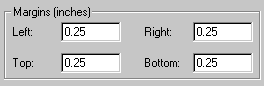
Set the Left, Right, Top and Bottom Margins to 0.25:
Click OK.
Important Note: Before printing the Form 1007 report, you must set the margins as follows:
Select the Page Setup option in the browser's File menu.
Set the Left, Right, Top and Bottom Margins to 0.25:
Click OK.
Once you have set the margins, they remain at the new settings until you change them again. This means that you only have to change them once, then can print as many Form 1007 reports as necessary.
Print the Form 1007 report as follows:
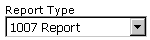
Select 1007 Report as the type of report using the report type drop-down list:
Click the Print button (which only displays when the estimate is calculated).
Click OK in the print window.